
You already know the symptom.
Your team asks the same questions in Slack every week. Sales keeps hunting for the latest deck. Support pings engineering because the answer exists somewhere, but nobody can find it fast enough. Product writes docs in one tool, operations stores policies in another, and customer context lives across CRM notes, tickets, email threads, and old PDFs.
At a certain size, this stops being a productivity annoyance. It becomes a growth tax. People repeat work, make slower decisions, and rely on whoever happens to remember where something lives.
That's why enterprise search has moved from “nice internal tool” to core infrastructure. The global enterprise search market was valued at approximately USD 4.87 billion in 2023 and is projected to reach USD 8.85 billion by 2030, with a projected 8.9% CAGR, according to Grand View Research's enterprise search market analysis. Buyers aren't spending on this because search is fashionable. They're spending because fragmented knowledge is expensive.
Your Company's Brain Is Scattered Is Enterprise Search the Answer
Growth-stage companies usually hit the same wall. The first fifty people can survive on tribal knowledge. The next hundred can't.
Your company's knowledge is split across Google Drive, Confluence, Slack, Jira, Notion, Salesforce, email, call transcripts, ticketing systems, and random spreadsheets with names like “final_v3_REAL.” Everyone knows the answer exists. Nobody knows where. That's the core problem.
Why this becomes a business issue
When information is hard to retrieve, work slows down in ways finance rarely sees cleanly on a dashboard.
- Sales loses momentum: reps wait on deal desk answers, security docs, or the latest pricing language.
- Support escalates too early: agents can't find the internal note that would solve the ticket.
- Ops creates duplicates: teams rewrite procedures because they don't trust what they find.
- Leadership gets inconsistent answers: two teams pull from two different documents and present two different realities.
Enterprise search solutions are meant to fix that by turning scattered systems into a single, permission-aware discovery layer. Done right, employees stop asking “where is it?” and start asking better questions.
A lot of founders make a mistake here. They think this is a documentation project. It isn't. Documentation helps, but search is the retrieval layer that makes existing knowledge usable. If your current knowledge base isn't serving the business, improving AI knowledge management for small business usually starts with retrieval, not another content migration.
Practical rule: If your team spends more time asking who knows the answer than searching for the answer, you don't have a documentation problem. You have a retrieval problem.
What enterprise search should actually do
A good platform doesn't just index files. It should:
- Connect systems securely: Slack, Drive, CRM, docs, ticketing, and internal databases.
- Respect permissions: people should only see what they're allowed to access.
- Understand intent: “SOC 2 questionnaire,” “security response,” and “vendor review answers” may refer to the same need.
- Return answers, not just links: users want the relevant chunk, paragraph, or grounded summary.
That's why enterprise search solutions are worth serious attention. They're not another employee perk. They're operationally advantageous.
What Are Enterprise Search Solutions Really
The easiest way to think about enterprise search is this: it's the GPS for your company's brain.
Without it, every employee finds their way using only memory. They know the destination exists, but they take a different route every time. Some routes are fast. Most are wasteful. New hires get lost immediately.
More than a search box
Most companies already have search bars. Google Drive has one. SharePoint has one. Confluence has one. Slack has one. That doesn't mean they have enterprise search.
Those built-in search tools are usually good at searching their own world. They're not good at searching your whole business context. A rep looking for an answer on contract terms may need a legal playbook in Drive, a Slack decision from last quarter, and a CRM note tied to a specific account. App-level search won't stitch that together.
Enterprise search solutions sit above those individual tools. They connect multiple repositories and create a unified retrieval experience. That's the difference.
The shift from documents to answers
Legacy search mostly returned lists. Modern search should return ranked evidence and, increasingly, a direct answer grounded in that evidence.
That changes user behavior. Instead of searching “refund policy PDF” and opening five tabs, someone can ask a natural language question and get the relevant answer with citations back to the original source. That matters because employees don't care about your information architecture. They care about finishing the task in front of them.
A practical way to judge whether a platform is modern or just dressed up:
| Capability | Weak approach | Strong approach |
|---|---|---|
| Scope | Searches one app well | Searches across business systems |
| Relevance | Keyword-only | Intent-aware and context-aware |
| Output | List of links | Answer-first with source grounding |
| Security | Separate permissions model | Respects source permissions |
| Usefulness | Helps browsing | Helps decision-making |
What this looks like inside a real company
A support lead asks, “What's our approved workaround for failed SSO setup?” A strong search system should pull the internal runbook, the engineering note, and the latest support macro. A weak one returns dozens of vaguely related docs because they contain “SSO.”
A finance manager asks, “Which version of the expense policy applies to contractors?” A strong system should direct them to the active policy, not archived drafts.
Good enterprise search solutions reduce internal dependency on “the person who usually knows.”
That's the strategic shift. Search is no longer just document retrieval. It's a way to make organizational knowledge usable at the moment of work.
The Engine Room Core Components Explained
If you're buying or building enterprise search solutions, you need to understand the stack well enough to spot bad architecture early. You don't need to become a search engineer. You do need to know what's essential.
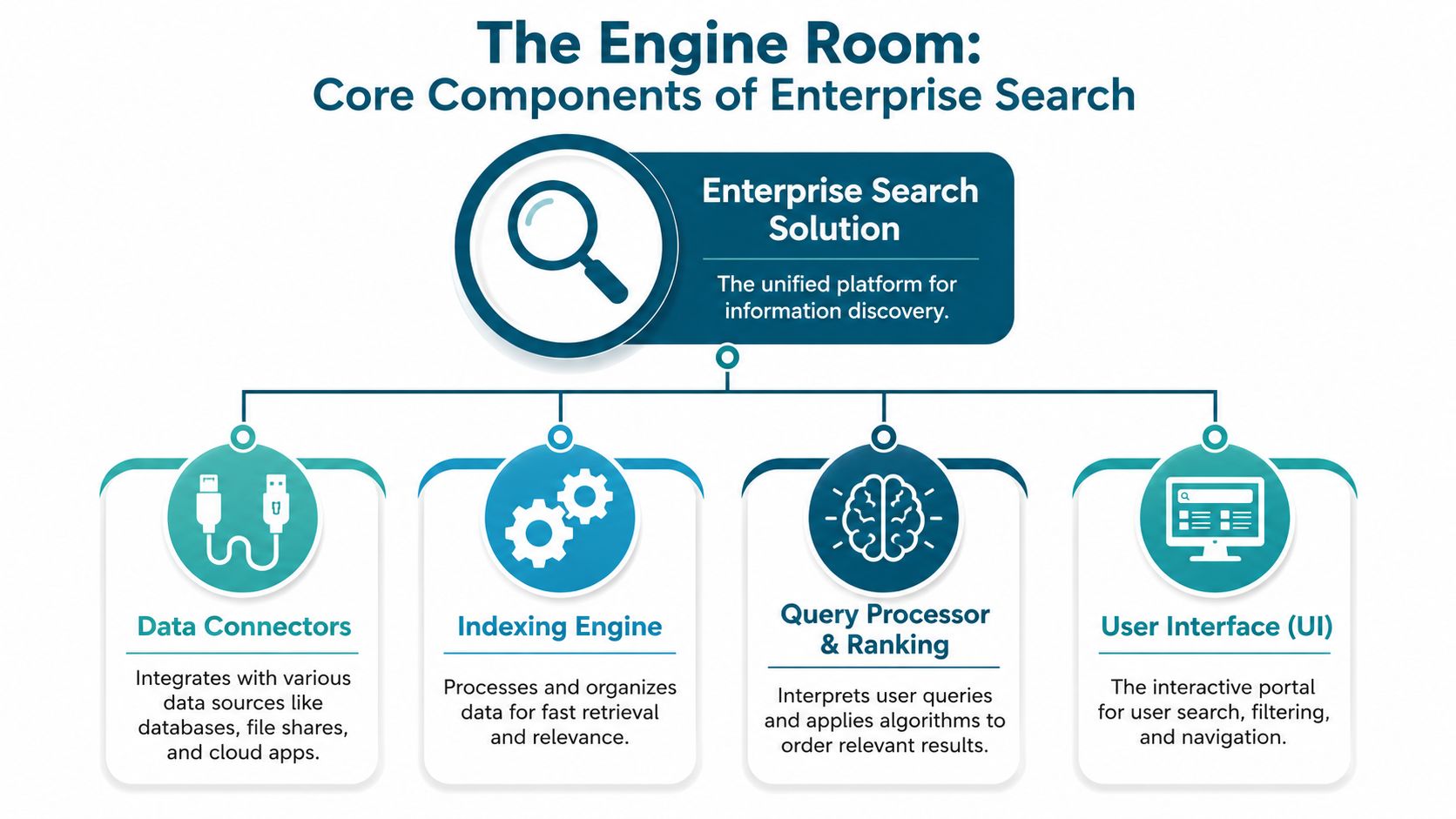
Connectors and ingestion
Every search system starts by getting data out of the tools your company already uses. That means connectors for platforms like Google Drive, Confluence, Slack, Salesforce, Jira, SharePoint, Notion, and internal databases.
But raw enterprise data is messy. Files have inconsistent titles. Permissions differ by system. PDFs may need text extraction. Ticket comments include junk. Meeting notes contain duplicate fragments. Good ingestion pipelines normalize all of that before retrieval ever happens.
This prep work matters because bad input creates bad search. If a vendor hand-waves ingestion, walk away.
Lexical retrieval still matters
Lexical retrieval is the traditional keyword-based layer. It matches exact words, phrases, and entities. That sounds old-school, but it's still critical.
If someone searches an exact contract ID, customer name, SKU, policy code, or product term, lexical search often wins. Pure semantic systems can miss those exact-entity matches. In business environments, that's unacceptable.
Vector retrieval handles meaning
Vector retrieval adds semantic understanding. Instead of matching only exact terms, it looks for related meaning.
That's how a user can search “How do I answer a security review?” and still retrieve content labeled “vendor questionnaire process” or “infosec response template.” This approach accounts for the fact that employees rarely use the same language as the person who wrote the document.
According to Morphik's guide to enterprise search engines, modern enterprise search solutions need hybrid retrieval that combines lexical and vector indexing to reach nDCG ≥0.8. The same benchmark summary also notes that top-performing AI-powered tools using RAG should deliver at least 90% tool calling accuracy and 90% context retention. Those aren't vanity metrics. They're practical indicators that the system can retrieve the right material and use it reliably in multi-step interactions.
For teams evaluating architecture in more depth, this overview of RAG pipeline architecture is useful background.
Hybrid retrieval is the baseline now. Keyword-only search is too brittle. Pure vector search is too fuzzy.
Ranking and permissions
Retrieval is only half the job. Ranking decides what appears first. In a real company, ranking should account for source quality, freshness, metadata, query intent, and user permissions.
If your search platform surfaces a stale document ahead of the active policy, your team will stop trusting it. Trust is fragile in internal tools. One bad result can reset adoption.
Permission enforcement is just as important. Search should bind to source-system access controls so users only see what they're authorized to see. If search breaks the security model, it creates risk. If it shows users results they can't open, it creates frustration.
RAG is how search becomes conversational
Retrieval-Augmented Generation, or RAG, combines retrieval with a language model that generates a readable answer from retrieved company data.
That's what powers internal AI assistants that can answer questions in plain language while grounding responses in your own documents, tickets, and records. Without retrieval grounding, a model may produce polished nonsense. With RAG, the answer can point back to actual company content.
A basic mental model:
- User asks a question
- Search retrieves the best relevant content
- The model synthesizes a response from that content
- The system cites the source material
That's the transition from search as a directory to search as a decision-support layer.
Unlocking Value Business Use Cases and ROI
Most leaders evaluate enterprise search solutions too narrowly. They ask whether results are relevant. That matters, but it's not the core buying question.
A key question is whether search improves revenue execution, lowers operational drag, and reduces avoidable manual work.
Where ROI shows up first
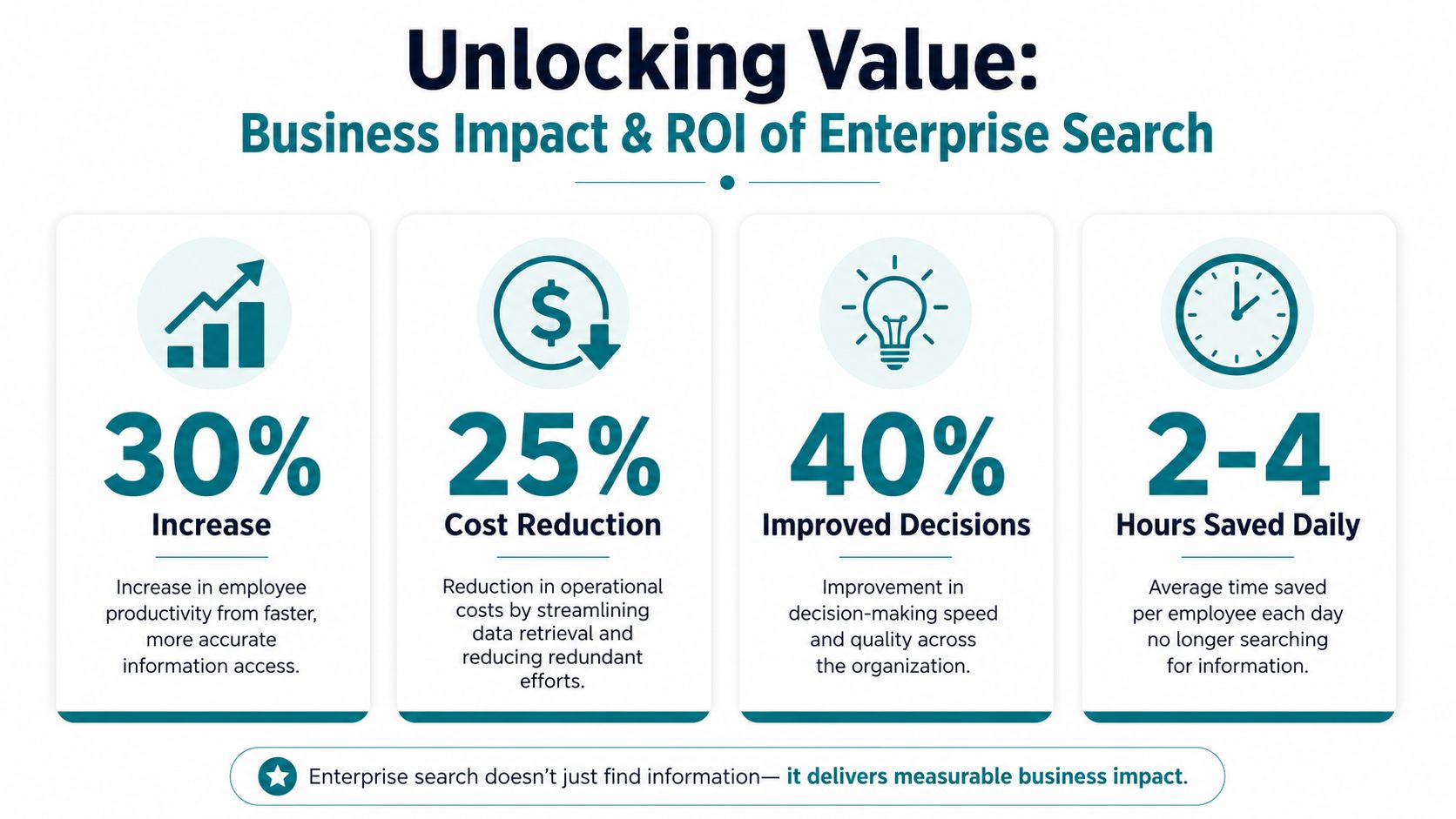
Organizations deploying AI-powered document intelligence and advanced enterprise search solutions report 45–75% reductions in document processing costs and 70–90% improvements in accuracy compared to manual processes, according to OpenKit's enterprise search report. That's the strongest hard ROI signal in this category because it ties retrieval and automation directly to operational outcomes.
The fastest wins usually come from workflows that already involve repetitive searching, interpretation, and handoffs.
High-value use cases for growth-stage teams
Sales enablement
A rep is live on a call and needs the current security questionnaire response, a case study for the buyer's industry, and approved language on data residency. Without search, they ping legal, sales engineering, and RevOps. The deal slows down.
With strong enterprise search, they ask one question and get the approved content set immediately. That shortens response cycles and reduces the number of internal interrupts created by every active deal.
If you work in commerce-heavy environments, it's worth looking at how Vertex AI Search for retail applies answer-first retrieval to customer and product workflows. The lesson carries over internally: speed matters most where the user is already in motion.
Customer support
A support agent doesn't need twenty documents on login failures. They need the exact fix, the latest known limitation, and the escalation rule.
Search pays off here because support work is retrieval-heavy by nature. Good search cuts time spent bouncing between docs, tickets, internal chats, and engineering notes. It also creates more consistent answers across agents.
Operations and compliance
Ops teams repeatedly chase policies, approval histories, onboarding materials, vendor docs, and process exceptions. A document-intelligent search layer can reduce that burden by finding the right artifact quickly and making structured information usable.
Cost reduction and accuracy gains often become obvious. Manual review work is expensive. Search that's tied to extraction, classification, and answer generation can remove a lot of low-value effort.
Product and engineering
Engineers rebuild things when they can't find prior work. Product managers repeat discovery when earlier research is buried. Search doesn't eliminate all duplication, but it makes historical context available when teams need it.
What to measure beyond relevance
Don't stop at query accuracy. Track business indicators that leaders care about:
- Time to answer: how quickly teams resolve common internal questions
- Escalation avoidance: whether fewer issues get pushed to specialists
- Reuse of approved assets: whether teams pull from standard materials instead of recreating them
- Workflow completion speed: whether knowledge-heavy processes move faster
If your pilot doesn't change a business workflow, it's a demo, not an investment.
That's why I recommend starting with one function where search is already tied to money, risk, or service quality. The ROI is easier to prove when the work is repetitive and measurable.
Navigating Integration and Deployment Patterns
Many enterprise search projects encounter difficulties at this stage.
Buyers obsess over the front-end demo and ignore the plumbing. Then implementation starts, and everyone discovers the hard part isn't ranking. It's integration.
Indexed, federated, or hybrid
You have three common deployment patterns.
Indexed search ingests content into a central index. It's often faster at query time and easier to tune for relevance. The tradeoff is duplication, more ingestion overhead, and added responsibility for syncing permissions and updates.
Federated search leaves data in source systems and queries them in place. That can fit stricter security or residency needs, but it often depends heavily on connector quality and may produce uneven performance across systems.
Hybrid approaches combine both. Shared, high-value content may be indexed, while more sensitive or rapidly changing sources remain federated. For most growth-stage companies, hybrid is the practical middle path.
The right answer depends on your stack, security posture, and implementation capacity. Don't choose an architecture because it sounds modern. Choose the one your team can operate.
Connector maturity is the hidden budget line
Here's the part vendors undersell. According to Recited's analysis of enterprise search implementation, 70% of enterprise search implementation time is spent on connector development for legacy systems and niche platforms. That should change how you evaluate every platform.
If your business runs on a handful of standard SaaS tools, deployment is simpler. If your critical knowledge lives in a weird mix of cloud apps, internal databases, file shares, and custom tools, connectors become the project.
That means your vendor scorecard should include questions like these:
- Which connectors are first-party and production-ready?
- Which ones require custom work?
- How are permissions synchronized across each source?
- What breaks when a source API changes?
- Who owns connector maintenance after launch?
Don't measure the wrong ROI
A lot of teams make a second mistake. They track search accuracy and response speed, then ignore the actual cost of ingestion infrastructure and connector upkeep.
That's backwards.
If a platform gives you excellent retrieval but requires endless custom connector work, your total cost climbs fast. Executive sponsors then wonder why “search” became an integration program. They're right to ask.
A better decision lens is this short comparison:
| Decision area | Bad buying logic | Better buying logic |
|---|---|---|
| Connectors | Count logos on the website | Validate the exact systems you use |
| Integration effort | Assume setup is routine | Price custom work and maintenance upfront |
| Architecture | Pick what sounds advanced | Match design to security and ops reality |
| ROI | Measure only relevance | Include ingestion and support costs |
The best enterprise search platform for your company is the one that retrieves from your real systems without creating a permanent integration burden.
That sounds unglamorous because it is. But it is at this point that successful deployments separate from expensive pilots.
An Implementation Roadmap for Growth-Stage Companies
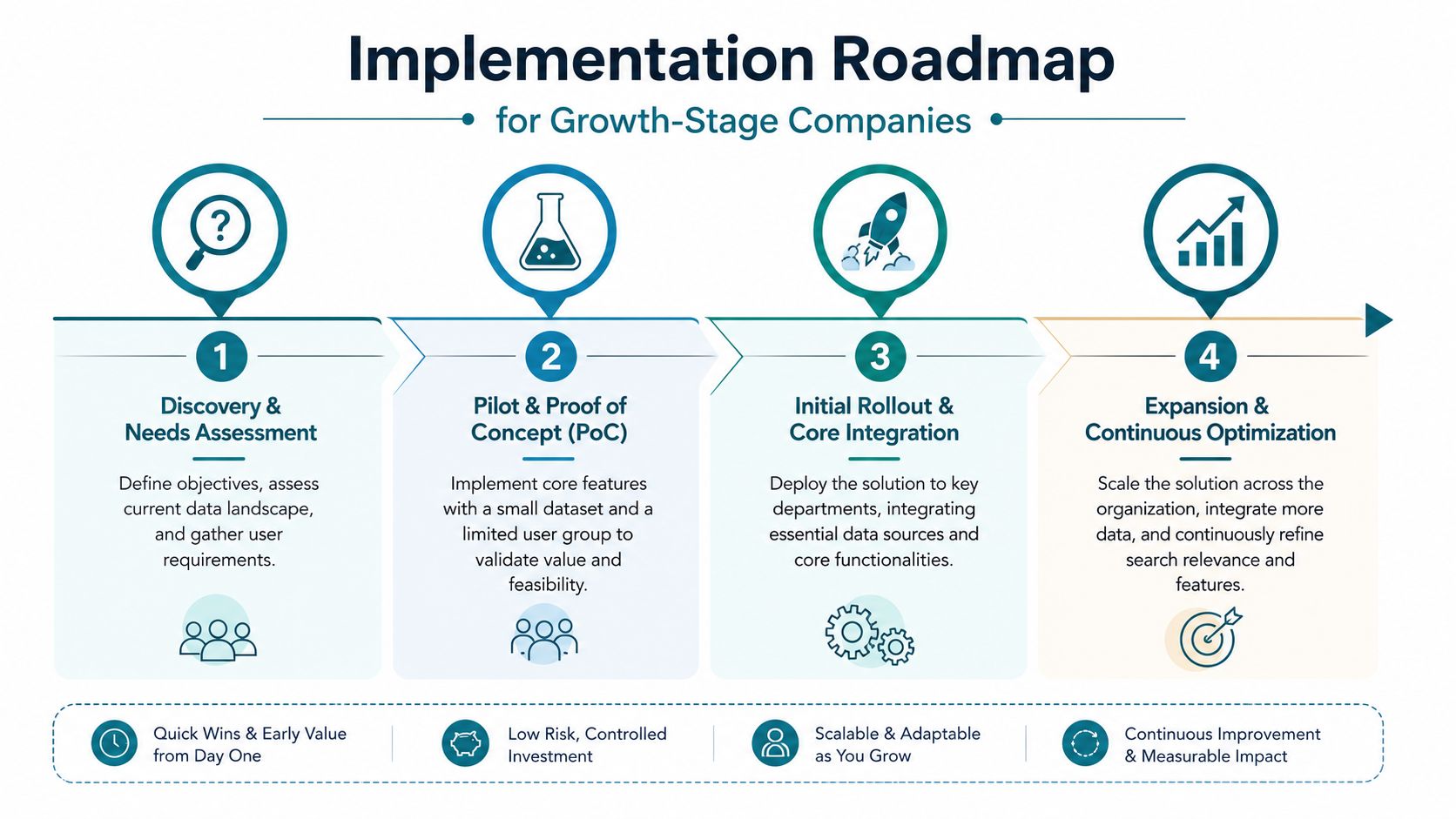
Most growth-stage companies should not begin with a full enterprise-wide rollout. That approach burns time, spreads ownership too thin, and delays proof of value.
Start smaller. Pick a workflow where retrieval failure is already painful, visible, and expensive.
Phase one starts with one painful use case
The best first project is usually a search-first RAG assistant for a single team.
Support is a strong candidate because the workflow is repetitive and answer quality matters. Sales enablement is another because revenue teams feel the pain immediately when content is hard to find. Compliance-heavy onboarding or document review can also work if manual searching slows approvals.
In this phase, keep the scope tight:
- Choose one department: support, sales, operations, or compliance
- Connect only core sources: for example Confluence, Drive, Slack, and your ticketing system
- Define success in workflow terms: fewer escalations, faster response preparation, better consistency
- Use real user questions: not curated demo prompts
If you need a reference point for what this can look like in practice, review examples of AI-powered enterprise search knowledge bases. The useful lesson isn't the interface. It's the sequencing: narrow scope, prove value, then expand.
Phase two builds the foundation
Once the pilot proves useful, expand deliberately.
This is when you refine metadata, improve chunking strategy, tune ranking, add missing synonyms, and connect more systems. You'll also discover where content quality is sabotaging retrieval. Search projects expose governance problems quickly. That's good. It forces cleanup where it matters.
Use this stage to standardize:
- Source prioritization: decide which repositories are authoritative
- Permission mapping: verify that access mirrors source systems
- Content freshness rules: define what gets archived, boosted, or deprioritized
- Fallback behavior: decide what happens when no strong answer exists
Phase three scales with governance
By now, the company usually wants broader rollout. Resist the urge to open everything to everyone at once.
Search quality degrades when teams dump in more sources without ranking controls, ownership, and analytics review. Scaling works best when each added source has a clear reason to exist and someone accountable for its usefulness.
At this stage, you should have regular review loops for:
- Zero-result queries
- Queries that produce weak or ambiguous answers
- Stale high-ranking content
- Repeated questions that suggest a content gap
- Permission edge cases
Start with a use case that already hurts. Don't start with a platform rollout in search of a problem.
Phase four turns search into an AI work layer
Once retrieval is stable, you can extend into more advanced capabilities. That includes AI copilots, multi-step assistants, workflow triggers, and richer answer generation grounded in enterprise data.
But don't rush there. Fancy orchestration on top of weak retrieval creates confident failure. Search maturity comes first.
The roadmap should feel boring in the best possible way: one clear use case, one measurable pilot, controlled expansion, then broader AI enablement. That's how growth-stage companies avoid turning a promising search initiative into a sprawling infrastructure project.
Choosing the Right Partner or Platform
Most buyers compare enterprise search solutions like they're buying standard SaaS. They stack vendor grids, scan features, and ask for a trial.
That's too shallow.
You're not just buying software. You're choosing who will help define how knowledge is accessed across your company. That makes this a strategy decision, not a widget purchase.

What good evaluation looks like
Start with five areas: relevance, security, integration burden, failure handling, and operating model.
Security should be obvious. The platform must respect source permissions, support your identity model, and avoid creating a shadow access layer. If a vendor treats permissioning like an add-on, reject them.
Integration burden matters just as much. A flashy demo can hide a painful rollout if your critical systems need custom connectors or brittle sync logic.
Then ask the question most buyers skip: What happens when search fails?
According to this discussion of enterprise search failures, 40–60% of enterprise search sessions end without users finding relevant content. That's a massive gap, and most vendor conversations barely touch it.
Ask vendors to show you their zero-result behavior. Not explain it. Show it.
Do users get alternative suggestions? Related intents? A route to the right expert? An option to surface the closest verified source? Or does the system just return “no results found” and call that acceptable?
A search platform should be judged by how it handles failure, not only by how it performs on perfect queries.
A better vendor scorecard
Use this table in procurement meetings. It's more useful than a generic feature checklist.
| KPI | What It Measures | Why It Matters for Growth Companies |
|---|---|---|
| Relevance quality | Whether top results actually answer the user's question | Poor relevance kills adoption fast |
| Permission fidelity | Whether results respect source-level access controls | Security mistakes create trust and compliance risk |
| Connector readiness | How much of your environment works without custom integration | Connector debt turns pilots into long projects |
| Time to first value | How quickly a team can use the system in a live workflow | Growth teams need visible wins quickly |
| Zero-result recovery | How the platform handles failed or ambiguous queries | Failure handling determines day-to-day usability |
| Admin tuning effort | How hard it is to improve ranking, synonyms, and source weighting | Lean teams need manageable operations |
| Citation quality | Whether answers link cleanly back to source content | Users trust grounded answers, not black-box summaries |
| Cost transparency | Whether pricing and infrastructure implications are understandable | Opaque cost models create budget surprises |
Questions I'd ask every vendor
- Show me how your system handles a bad query.
- Show me the exact connectors for our top systems, not your full catalog.
- Show me how permissions are inherited and updated.
- Show me what admins can tune without engineering help.
- Show me how citations appear in generated answers.
- Show me what ongoing maintenance looks like after go-live.
That last point is where implementation partners matter. A strong partner helps with scoping, source prioritization, relevance tuning, and business KPI design. A weak one installs software and disappears.
If you're evaluating who should help you deliver the project, use the same rigor you'd use for any strategic build. This guide on choosing an AI development partner is a good lens for that process.
The best choice usually isn't the platform with the longest feature list. It's the one that fits your stack, respects your security model, proves value fast, and gives your team a realistic path to operate it well.
AmasaTech helps growth-stage companies turn AI ideas into production systems tied to business outcomes. If you're exploring enterprise search solutions, RAG assistants, or a broader AI-first roadmap, AmasaTech can help you scope the right pilot, connect the right data, and measure success against real operational KPIs instead of vague AI promises.